AI Insights
Review practice numbers, forecast demand, and spot clients who are overdue for a check-in.
AI Insights is the sidebar page for how the business is doing and where to act next. It starts with your key numbers, then adds two AI tools that run when you ask: a demand forecast for your services, and a list of clients who look like they are drifting away. Nothing runs on its own, and nothing is sent to a client from this page.
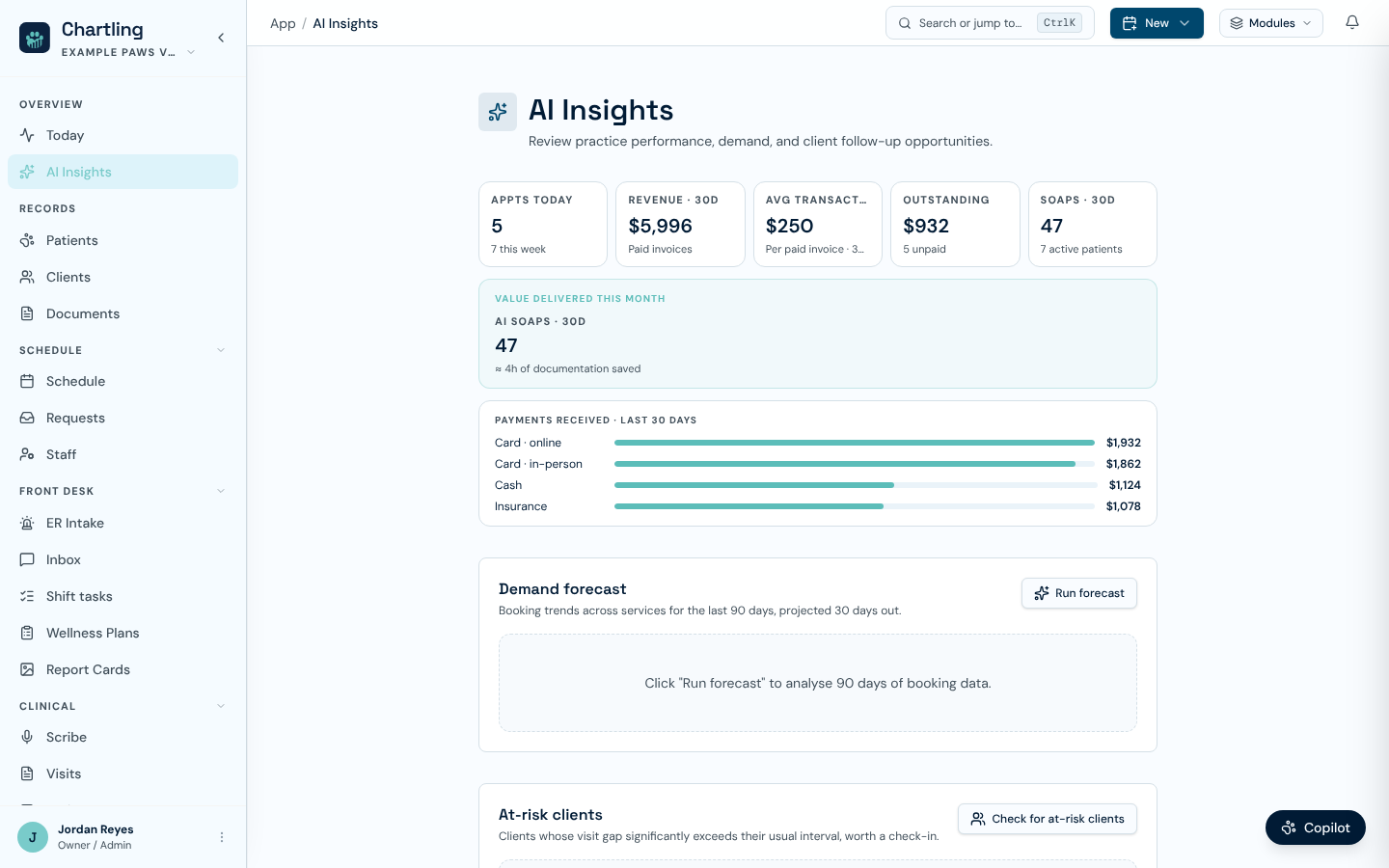
AI Insights before a forecast is run (sample data)
Practice metrics
The top of the page holds the numbers that used to head the Today page:
- A row of tiles: Appts today (with the week's count), and, for staff who can view financial reports, Revenue for the last 30 days, Avg transaction, and Outstanding with the number of unpaid invoices. Clinic workspaces also see SOAPs for the last 30 days with the active patient count. Each tile links to the page behind it.
- Value delivered this month: AI-drafted SOAPs over 30 days with an estimate of documentation time saved (clinic workspaces), and Missed charges found, which counts charges the charge sweep resolved, shown once there is at least one.
- Payments received, a bar for each payment method over the last 30 days, for staff who can view financial reports. It shows nothing when no payments were recorded in the period.
Demand forecast
Click Run forecast. Chartling reads the last 90 days of bookings across your services and projects 30 days ahead. You get:
- A short summary.
- One row per service with its average bookings per week, its busiest weekday, and whether recent demand is growing, stable or declining.
- Capacity flags for services likely to fill up, with an Open scheduling link.
- A Recommendation for the front desk, for example opening extra daycare slots on a busy day.
Click Refresh to run it again. Results are not saved: reopening the page starts blank until you run it.
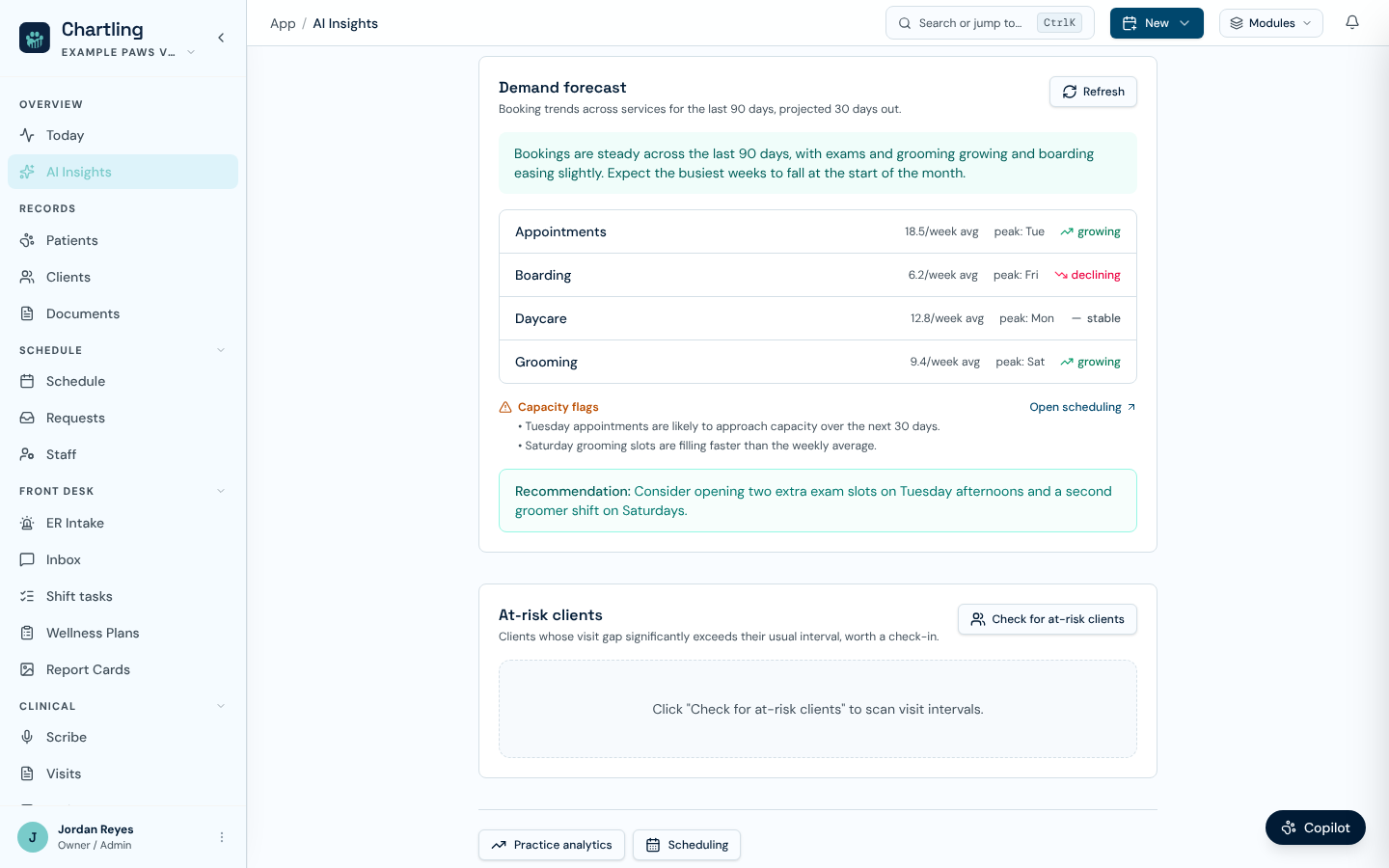
A demand forecast result. The figures shown are sample data, not real clinic numbers.
At-risk clients
This section appears in clinic workspaces. Click Check for at-risk clients to scan visit history. Chartling looks at clients with at least two visits whose last visit was 60 or more days ago, and picks out those whose gap is well past their own usual interval (more than 1.5 times). It lists up to 20, each with:
- The client and pet, the last service, days since that visit, and their usual interval.
- A High risk or Medium risk badge. High means the gap is more than twice their usual interval.
- A suggested next step, and a Find client record link.
When nobody stands out, the page says there are no clients with unusual gaps right now. The list is a prompt for a friendly check-in, such as a call or a recall campaign, not a verdict.
Service insights
Workspaces without clinical services (boarding, daycare, grooming, training) see Service insights instead of at-risk clients. Click Get insights to review the last 90 days: key figures for pets, repeat bookings and memberships, a summary, a few opportunities by area, and a list of regulars who have not booked lately, each with a link to their client record.
Who can use it
AI Insights is part of the Operations and Practice plans. On other plans the page shows an upgrade card in place of the tools. Running the forecast, the at-risk scan or service insights needs the ai.ops.use permission, and each run counts toward your plan's AI operations allowance. Staff without the permission still see the metrics, but the run buttons are disabled with the note "Your role doesn't include AI usage".
FAQ
No. It is a pattern read of recent bookings with a written suggestion. Use it as a prompt for staffing and slot decisions, and check it against what you know about holidays and local events.
Revenue, outstanding balances and the value tiles moved here. Today keeps the live board for the day.
AI Insights needs the Operations or Practice plan. See Plans & pricing.