Visits & SOAP notes
Record a visit from check-in to signed note.
On this page
-
Start the visit
From the patient record, click New visit. Select the visit type (wellness, sick, surgery, etc.) and confirm the presenting complaint. The visit opens with a blank SOAP form.
Record the patient's weight at check-in. It's displayed in your clinic's configured unit and stored in kg for dosing calculations.
-
Consent is always on record
Every SOAP note needs a linked consent event before it can be saved. Chartling enforces this server-side, so there's no way around it. Typing the SOAP by hand doesn't prompt the client; Chartling logs a one-party consent event automatically on your behalf (no audio, just your own typed notes). If you use AI scribe to record the exam, click Start recording. Chartling shows the client a consent prompt first and won't start the microphone until they confirm Confirm & start recording. Either way, the consent event is timestamped and linked to the visit automatically.
-
Complete the SOAP
Fill in Subjective, Objective, Assessment, and Plan. Each section supports free text plus structured fields (vitals, differentials, lab orders). Technicians can draft the SOAP before the vet arrives. The note stays a draft until someone with the
visit.signpermission signs it. -
Add medications and charges
In the Plan section, prescribe medications and add diagnostic or treatment line items. These become the basis for the invoice. See Medications & Rx for dispensing and controlled substance workflows.
-
Sign and finalize the visit
Finalizing requires the
visit.signpermission (the Vet, Associate Vet, Vet Tech, Senior Tech, and Owner / Admin packs hold it by default). The visit review screen lists each proposed item (SOAP, medications, charges, and more) individually; click Confirm all to accept everything in one step instead of confirming each card by hand, or work through them one at a time in the classic layout or the two-pane triage layout, whichever display you've set. Then click Sign & finalize visit. Chartling shows your name and credentials, pulled from your own staff profile, and asks you to click to attest; it's a single confirmation, not a typed name or a drawn signature. This signs the SOAP note (status moves to signed, with a signer stamp and timestamp, never a draft), seals the visit record, logs any controlled-substance dispenses pending witness, and posts the medication and inventory movements. Once finalized, the SOAP is locked. Corrections are recorded as an amendment (see Amending a signed note), never as a silent edit.Invoicing, reminders, and the owner discharge email/SMS only fire for clinics whose plan includes them (Practice includes all three; Intelligence generates the discharge content but not the invoice, reminder, or send. See Discharge instructions). A note that needs a co-sign is still signed and sealed immediately, but its owner-facing discharge is held back until a supervising clinician co-signs.
Visits and SOAP notes are available on Free, Intelligence, and Practice. On Free, the AI scribe counts against your 100 AI actions a month. The signed SOAP, medications, controlled-substance logs, inventory movements, and visit seal always happen on finalize, on every plan. Generating the invoice is a separate step that runs only on plans that include invoicing, which among plans with visits means Practice. A Free or Intelligence clinic gets a signed, sealed visit with no invoice; Intelligence clinics typically bill through an external PIMS. See Invoicing & payments for which tiers include invoicing.
ER walk-in intake
An emergency that walks in without an appointment can be checked in, triaged, and started as a visit from ER Intake. See ER intake for the full workflow.
Co-signatures
Co-signing is available on Intelligence and Practice. Some staff are set up so that every note they sign must be reviewed by someone else. The Vet Tech and Senior Tech packs do this automatically: when you assign one of those packs to a person, their signed notes are flagged for co-sign. A note that needs a co-sign is signed and sealed as usual, and the discharge summary is withheld from the owner portal until the co-sign is complete.
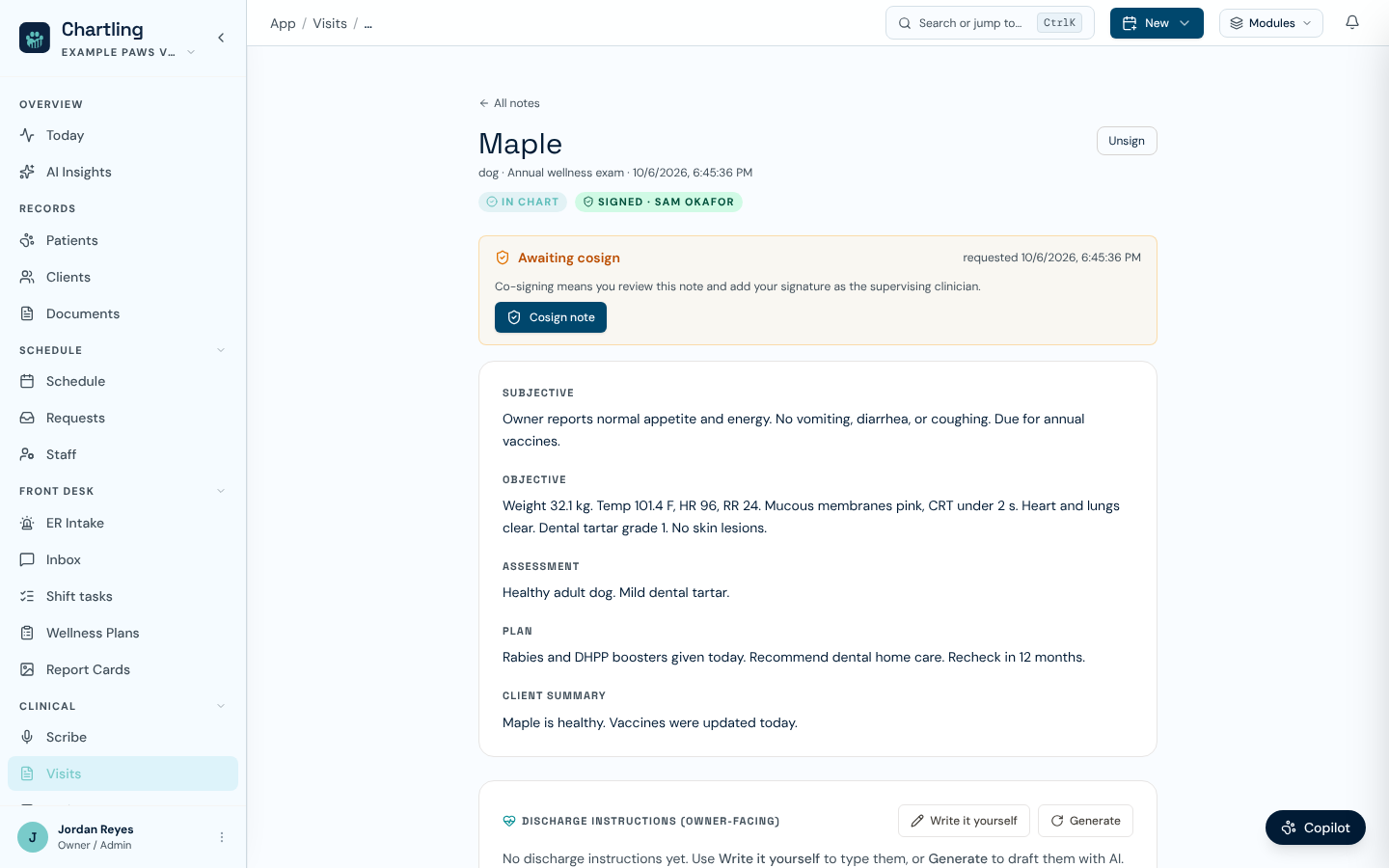
A signed note awaiting co-signature (sample data)
When such a note is signed, a Cosign item for that patient appears in Shift tasks, assigned to the signer's supervising vet when one is set. Open the note, which shows Awaiting cosign, review it, click Cosign note, and confirm with your name, credentials, and optional drawn signature. Co-signing needs the visit.cosign permission (Vet and Owner / Admin packs by default), and the co-signer must be a different person from the one who signed.
Amending a signed note
A signed note is never edited in place. To correct it or add to it, open the signed note or the finalized visit and add an amendment (Add addendum on the note page, Add amendment on the visit page). Write the correction and, optionally, a reason. The amendment is saved with your name and the time, appears under Amendments, and the original note stays unchanged. Amendments cannot be edited or deleted afterward. This needs the visit.amend permission (Vet, Associate Vet, and Owner / Admin packs by default).
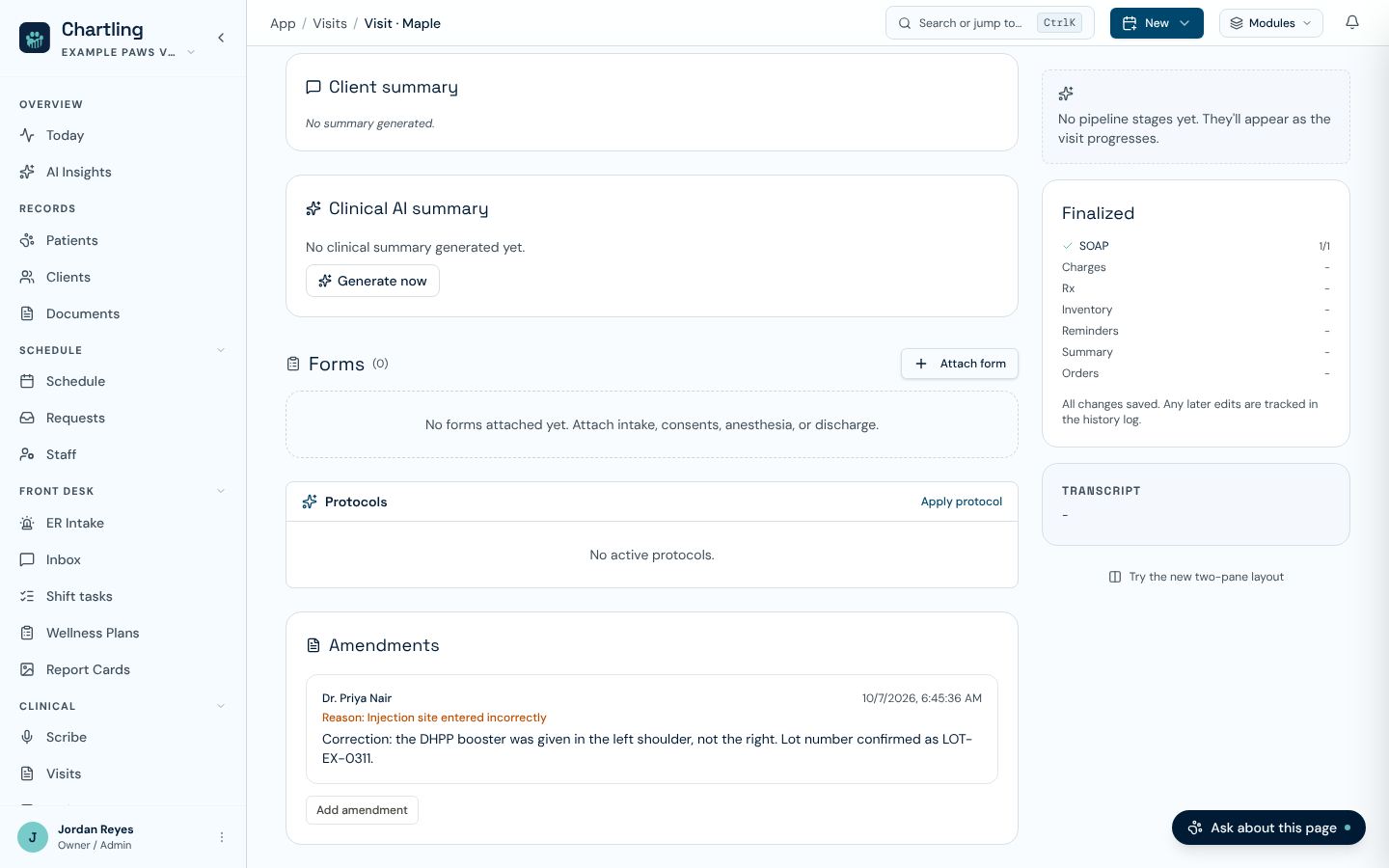
An amendment on a finalized visit (sample data)
From a signed note's page, someone with visit.amend can also click Unsign to reopen the note for editing. Unsigning is recorded in the audit log, and the note must be signed again afterward.
Unsigned SOAP notes appear under Visits → Unsigned, scoped to your own notes. They are not visible to the owner in the portal until signed and finalized. From that tab you can select several ready notes and batch sign them in one action instead of opening each visit individually, which clears end-of-day note debt quickly.
FAQ
Yes. Vet Tech and Senior Tech packs can start a visit, enter vitals, and write the SOAP. They can also sign it, but a tech-signed note is flagged for co-sign: it is sealed right away, and the owner discharge waits until a supervising clinician co-signs. The vet can review the note and co-sign from any device.
Chartling auto-saves the SOAP draft every few seconds. Reopen the visit from the patient record. Your draft will be exactly where you left it.
No. The co-signer must be a member of your clinic who holds visit.cosign and is not the person who signed the note. Guest or external co-signers are not supported.
Not the full SOAP. Owners see a discharge summary in the portal, which is derived from the Plan section. The clinical SOAP text (Subjective, Objective, Assessment) is clinic-only.