Documents & forms
Every invoice, summary, lab result and signed form in one searchable list, plus the forms you use at the front desk.
Documents in the sidebar is the clinic's file cabinet: every invoice, discharge, lab result and signed agreement in one searchable list. It has three tabs: All documents, Forms and Report cards.
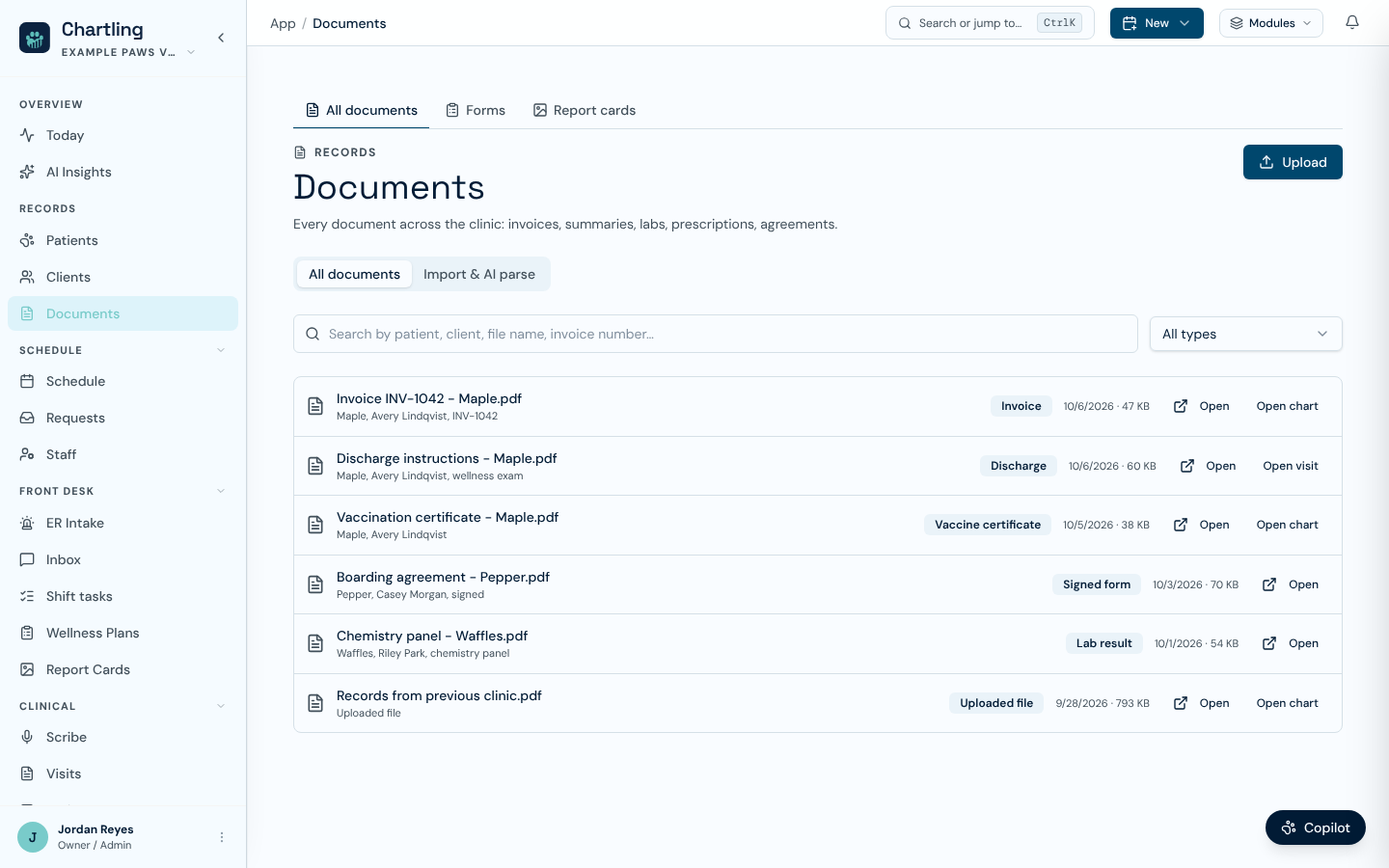
The Documents library (sample data)
All documents
Search by patient, client, file name or invoice number, and filter by type. The types are Invoice, Estimate, Clinical summary, Discharge, Vaccine certificate, Lab requisition, Lab result, Prescription, Controlled Rx and Signed form. Workspaces without clinical services see only the types they can produce. Files that staff uploaded by hand show as Uploaded file.
Each row shows the file name, its type, the date and the size. Invoices carry a Void, Deposit or Paid badge. Open opens the file in a new tab. Where the file is attached to a record, a second button jumps to it: Open invoice, Open visit, Open chart or Open client. The list loads 50 at a time.
Uploading a file
Staff with patient.write or owner.write see an Upload button. In the window:
- Add files
Choose one or more. PDFs, images, Word files, text, CSV and Excel files are accepted, up to 25 MB each.
- Attach to
Search for the patient or client the files belong to. They then open from that chart's Documents tab, from this page and from search.
- Add a description
Optional.
Who sees which documents
The list only shows files you are allowed to open. A document attached to several records, such as a paid invoice that is linked to the invoice, the patient and the client, needs permission for each of them. Two types have their own extra rule: an Estimate needs invoice.read, and a Controlled Rx needs one of the controlled-substance permissions (rx.controlled.dispense, rx.controlled.witness or rx.controlled.reconcile). If a colleague can see a file you cannot, a permission is the reason. See Team & permissions.
Forms
The Forms tab covers intake, consent, anesthesia and discharge forms, and any form you build yourself. It is part of every paid plan. Forms use the same AI fill as the rest of Chartling.
- Start a form: pick a published template, grouped by category. Filling a form needs
form.fill, and signing needsform.sign. When you arrive from an appointment, the forms tagged for that appointment type are listed first, with the rest under a collapsed heading. - Recent submissions: the latest form documents with their category, time and status. Click one to open it.
- Client intake: a shortcut to incoming client intake submissions.
- Manage templates, Use a preset and Draft with AI (needs
template.write): open the template builder in Settings. A preset starts from a ready-made form. Draft with AI writes the fields from your description. Either way the new form stays a draft until someone withtemplate.publishreviews and publishes it, and a banner on this page lists drafts waiting for that.
Import and AI parse
Staff with the import.run permission also see an Import & AI parse tab on the Documents page. It is the same migration tool described in Importing from your old system.
FAQ
Check the type filter and the search box first. If both are clear, you may not have permission to open what the file is attached to. Ask an admin.
The upload window attaches to a patient or a client. Files that Chartling generates, such as invoices and discharges, attach themselves to their visit or invoice.
Open the Forms tab, then Manage templates, Use a preset or Draft with AI. You need template.write, and publishing needs template.publish.